For agency developers
One stack, every client.
Model each client’s content once, build their site with whatever you already use, and read it through the site’s own channel. The client edits in the Studio, and you never build another CMS admin.
your frontend
import { createBlockRegistry, createMoteurPublicClient } from '@moteurio/client';

const moteur = createMoteurPublicClient({
  baseURL: 'https://api.moteur.io',
  auth: { type: 'apiKey', apiKey: process.env.MOTEUR_KEY, projectId: 'client-site' },
});

// One block type, one component of yours.
const blocks = createBlockRegistry({
  load: type => import(`./blocks/${type}.ts`),
});

const article = await moteur.channel('public').entries.get('article', 'spring');
const body = await blocks.renderBlocks(article.data.body, 'fr');
Week one
A new client, the same week
The same steps for every project, whatever the stack.
Model the content
In the Studio or as JSON files in the project’s repository: models, blocks, shared groups of fields.
Map blocks to components
One block type, one component in your code. The client builds pages from those, and only those.
Give the site a channel
Choose the models and fields it reads, published only, and a key that can only read, from your domains.
Rebuild on publish
A signed webhook tells your host when something goes live, and previews show drafts on the real site first.
For your developers
Model it once, the way the site needs it
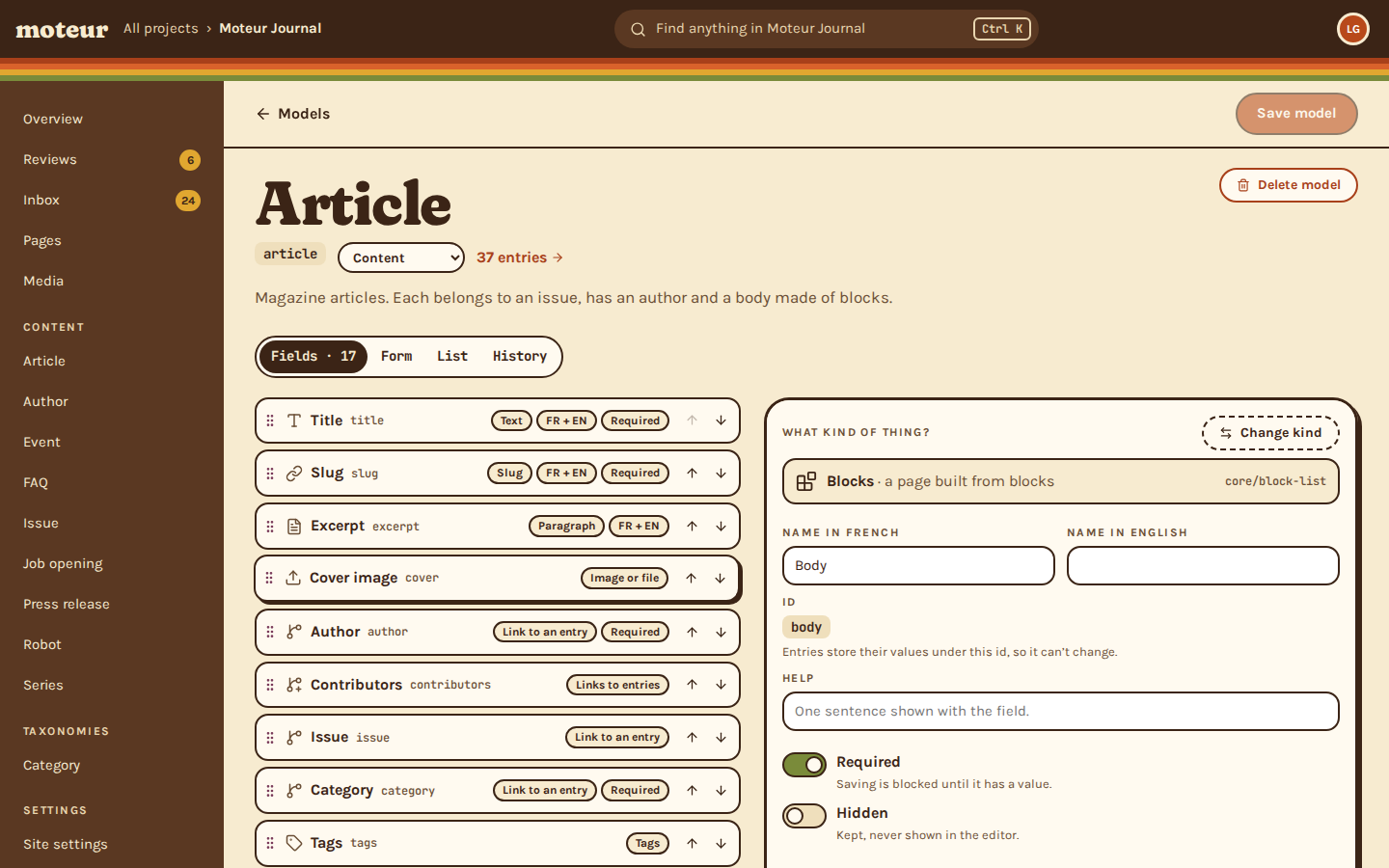
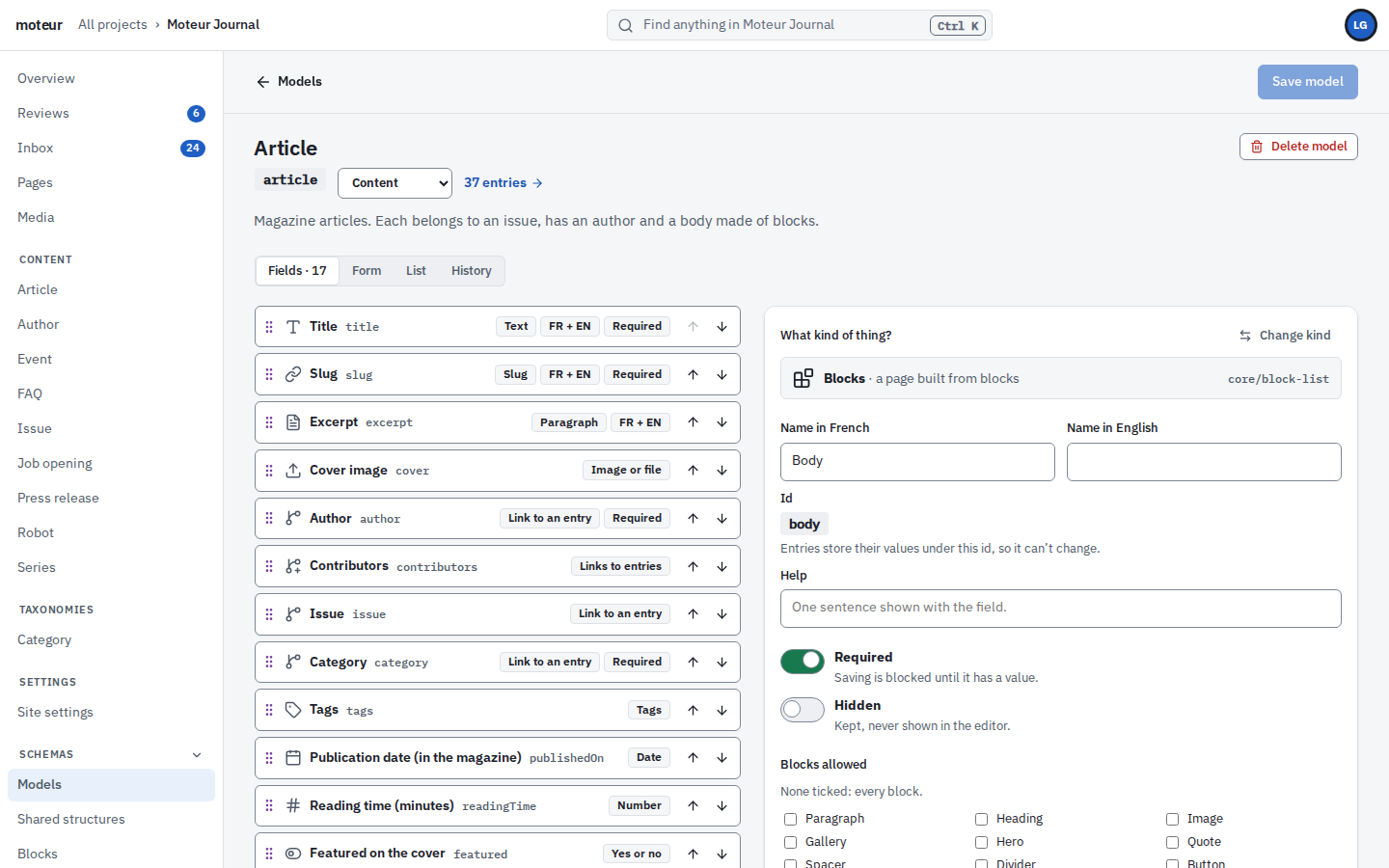
A model is what an entry holds. A block is what a page can be made of. You write the frontend against both, and the client’s team fills them in.
- Forty kinds of field: text, rich text, dates, media, links to other entries, lists of blocks
- Each field holds one value per language, or one for all
- Models are files in the project’s Git repository: edit them in the Studio or in your editor, and roll any of them back
- Add a field after launch and nothing breaks: existing entries simply get it, empty
- Only builders and developers change a model, and the API holds that line, not just the Studio
Beyond the API
The toolbox
Everything you’d script against a CMS, already there.
CLI
A command line for everything
Most of what the Studio does, as `moteur` commands, for scripts, CI and the evening you’d rather not click.
- The same commands as the MCP tools
- JSON output for your scripts
terminal
moteur entries list article --status in_review --json moteur entries update article glace --set readingTime=4 moteur models create --file=model.jsonGit
Your content, in Git
Each project is a repository of plain JSON files. Push it to your own remote, branch it, merge it.
- A commit for every save
- Branches through the API and CLI
Webhooks
Signed webhooks
Twenty-eight events, from a publish to a form submission, signed so your server knows it’s us.
- Retried for two hours
- Filtered by model, status and language
POST to your endpoint
{ "event": "entry.published", "projectId": "client-site", "data": { "modelId": "article", "status": "published", "slug": "my-post" } } X-Moteur-Signature: sha256=…Images
Images, at the size you ask
Every picture resized on request, in WebP or AVIF, around the focal point the client chose.
- Cached for a year
- Alt text in every language
Previews
Drafts, on the real site
The Studio’s preview opens your site with a short-lived token, so your site can show drafts before they go live.
- Tokens last 30 minutes
- Can be limited to one entry
Plugins
Your own field types
When a client needs something the 40 field types don’t cover, add a field or a block with the plugin SDK.
- Typed, in TypeScript
- The engine is open source
Channels
Read exactly what the site needs
A channel is what one site sees of a project: the models and fields you choose, published content only. The same read, in the stack each client’s site uses.
- Its own OpenAPI document, to download or generate types from
- Linked entries in the same request, up to two levels deep
- A read-only key, limited to that channel and your domains
src/pages/index.astro
---
import { createMoteurPublicClient } from '@moteurio/client';

const moteur = createMoteurPublicClient({
  baseURL: 'https://api.moteur.io',
  auth: { type: 'apiKey', apiKey: import.meta.env.MOTEUR_KEY, projectId: 'client-site' },
});

const articles = (await moteur
  .channel('public')
  .entries.list('article', { limit: 10, sort: '-publishedAt' })) as Article[];
---

<ul>
  {articles.map(a => <li>{a.data.title.en}</li>)}
</ul>
app/page.tsx
import { createMoteurPublicClient } from '@moteurio/client';

const moteur = createMoteurPublicClient({
  baseURL: 'https://api.moteur.io',
  auth: { type: 'apiKey', apiKey: process.env.MOTEUR_KEY!, projectId: 'client-site' },
});

export default async function Page() {
  const articles = (await moteur
    .channel('public')
    .entries.list('article', { limit: 10, sort: '-publishedAt' })) as Article[];
  return (
    <ul>
      {articles.map(a => <li key={a.id}>{a.data.title.en}</li>)}
    </ul>
  );
}
server/api/articles.ts
import { createMoteurPublicClient } from '@moteurio/client';

const moteur = createMoteurPublicClient({
  baseURL: 'https://api.moteur.io',
  auth: { type: 'apiKey', apiKey: process.env.MOTEUR_KEY!, projectId: 'client-site' },
});

// The page calls useFetch('/api/articles'): the key stays on the server.
export default defineEventHandler(() =>
  moteur.channel('public').entries.list('article', { limit: 10, sort: '-publishedAt' }),
);
articles.php
<?php
// Plain HTTP: any language that can send a header can read a channel.
$url = 'https://api.moteur.io/projects/client-site/channels/public/article/entries'
     . '?locale=en&limit=10&sort=-publishedAt';
$context = stream_context_create(['http' => [
    'header' => 'x-api-key: ' . getenv('MOTEUR_KEY'),
]]);
$articles = json_decode(file_get_contents($url, false, $context), true);

foreach ($articles as $article) {
    echo '<li>' . htmlspecialchars($article['data']['title']) . '</li>';
}
Questions developers ask
A developer asksDo we get TypeScript types?
MoteurYes. `moteur types` writes them from the site’s channel: a type for every model, block and structure. Commit the file, and a change in the project shows up as a diff.
A developer asksWhich frameworks?
MoteurAnything that can make an HTTP request: Next.js, Astro, Nuxt, Eleventy, plain PHP. The TypeScript client helps on JavaScript sites. The REST API works everywhere.
A tech lead asksCan we version the models with our code?
MoteurModels are JSON files in the project’s Git repository. Push it to your own remote, and review a model change like any other change.
A developer asksHow do we work locally?
MoteurPoint your site at a Moteur Cloud project with its own key, or run the open-source engine on your machine.
A developer asksWhat happens when we change a model?
MoteurAdding a field is safe: existing entries get it empty. A field’s id can’t be renamed once it’s used, and every model change is a commit you can roll back.
Build your next client site on Moteur.
Start a project for free, model its content, and point your frontend at it.